
1. Updates to the FarmDroid web app
More field data on the map
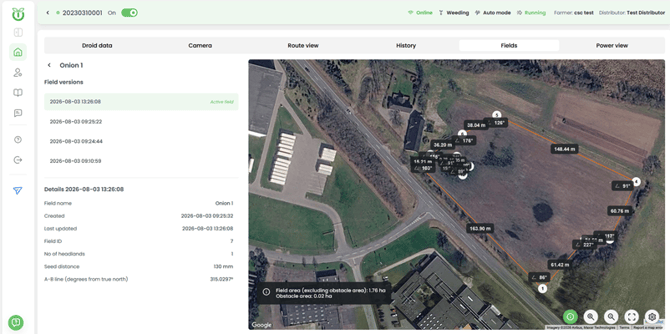
You can now see field sizes and other field data directly on the map. In the Fields tab, select a field and a version, then click the Info button in the bottom right corner of the map. Click Info again to toggle the field info off.
FarmDroid Assistant can now speak your language
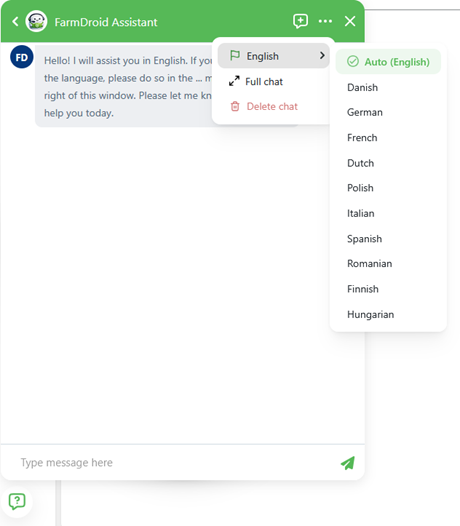
You can set the language of your FarmDroid Assistant so Odin speaks to you in your own language. You can also view chats full-screen and delete chats you no longer want to keep. All of these functions are accessed by clicking the three-dot menu in the top right corner of the Assistant window.
SIM card numbers on base stations
SIM card numbers for your base stations are now visible in the app.
2. Updates to the FarmDroid mobile app
A cleaner layout for better user experience
The mobile app has a new menu and top bar, the FarmDroid Assistant sits in a better spot on screen, and choosing your robot is made simpler. You can also drag the field details panel up and down to see more or less of the field. To delete an Assistant chat on mobile, swipe left on the chat.
History view now matches the web
The mobile history view has been updated to match the web view. This is available for premium subscription.
In the video below you can watch the mobile app walkthrough in 2 minutes.