
Why overlap settings matter
When field passes meet a headland at an angle rather than at approximately 90 degrees, different parts of the implement enter the headland at different times.
The FD20 does not use individual section control. As a result, the robot cannot switch separate sections of the implement on or off independently. Instead, the Overlap Function determines whether seeding and weeding continue while the implement moves through the transition area.
This transition area is called the overlap zone.
How the FD20 moves through an overlap zone
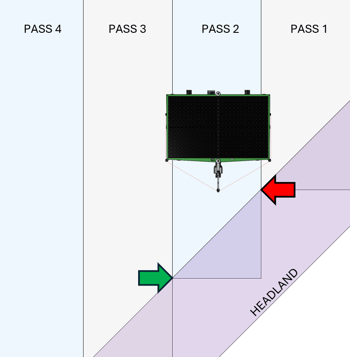
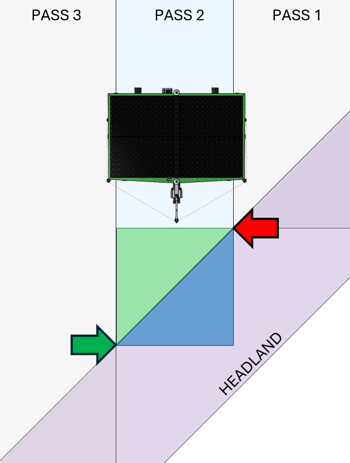
Imagine the FD20 travelling down a field pass, from the top of the illustration toward the bottom:
- The FD20 follows the planned pass toward the headland.
- The front-left corner reaches the headland first, indicated by the red arrow.
- The robot detects that the implement has entered the headland zone.
- Any overlap function enabled in the HMI is activated.
- The FD20 continues moving forward.
- The bottom-right corner leaves the pass, indicated by the green arrow.
- The FD20 stops and raises the hitch.
- Any active overlap function is deactivated.
- The robot turns in the headland and continues to the next pass.
The area between the red and green arrows is the overlap zone. It extends across the FD20’s full working width.
What happens inside this zone depends on the selected seeding and weeding overlap settings.
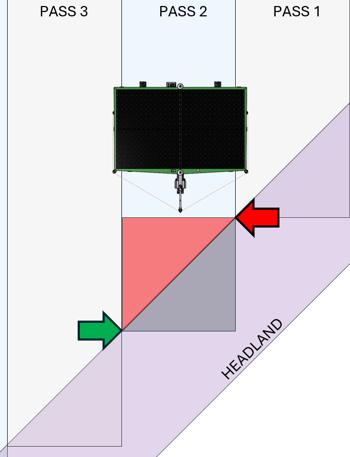
Scenario 1: Seeding overlap OFF | Weeding overlap OFF
With both overlap functions switched off, neither seeding nor weeding continues while the FD20 moves through the overlap zone.
What this means
- Red areas remain unseeded and unweeded.
- Grey areas are seeded and weeded later during the normal headland operation.
What the customer should consider
This setting prevents double treatment, but it can leave untreated gaps where an angled pass meets the headland. The customer should review whether these gaps are acceptable or whether additional work will be necessary.
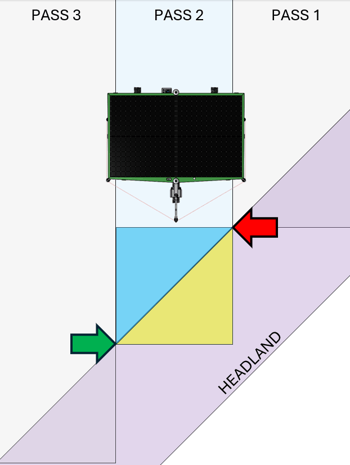
Scenario 2: Seeding overlap ON | Weeding overlap ON
With both overlap functions switched on, the FD20 continues seeding and weeding throughout the overlap zone.
What this means
- Blue areas are seeded and weeded once as part of the normal operation.
- Yellow areas are seeded and weeded twice:
- Once while the FD20 travels along the field pass.
- Once while the FD20 operates along the headland.
What the customer should consider
This configuration provides the most complete coverage, but some areas receive two treatments.
Double seeding does not normally produce a corresponding increase in yield. In addition, weeding the same area from two directions may disturb or remove some established plants in the yellow zones.
Important: Where possible, create or adjust field boundaries so that passes meet the headland at angles close to 90 degrees. This reduces the size of the overlap zone and limits unnecessary double treatment.
Scenario 3: Seeding overlap ON | Weeding overlap OFF
With seeding overlap switched on and weeding overlap switched off, the FD20 continues sowing in the overlap zone but pauses weeding.
What this means
- Green areas are seeded normally but are not weeded during the pass.
- Blue areas are seeded twice:
- Once during the field pass.
- Once during the headland operation.
- Purple areas receive their normal weeding treatment during the headland operation.
What the customer should consider
This setting prioritizes crop coverage while reducing the risk of additional weeding damage.
However, the green areas may receive no mechanical weeding. Depending on local weed pressure, the customer may need to inspect these zones and perform additional manual or targeted weed control.
Scenario 4: Seeding overlap OFF | Weeding overlap ON
With seeding overlap switched off and weeding overlap switched on, the FD20 pauses sowing in the overlap zone but continues weeding.
What this means
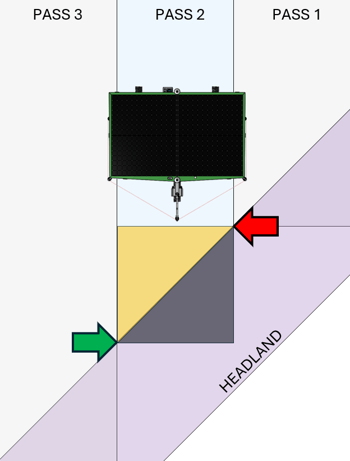
- Orange areas are not seeded, but they are weeded normally.
- Black areas are seeded during the headland operation.
- Black areas are weeded twice:
- Once during the field pass.
- Once during the headland operation.
What the customer should consider
This configuration may help maintain weed control, but it can create unseeded areas in the orange zones.
Plants in the black zones may also be exposed to an additional weeding operation. The second treatment, particularly when performed in a different direction, may remove or damage some plants.
Choosing the most suitable settings
There is no single overlap configuration that is ideal for every field. The best choice depends on:
- Field shape and boundary angles
- The relative size of the pass area and headland area
- Desired crop coverage
- Weed pressure
- Sensitivity of the crop to repeated weeding
- Availability of manual follow-up work
General recommendation
When the area covered by the field passes is larger than the area covered by the headland, enabling both seeding overlap and weeding overlap will usually provide the most complete coverage.
Customers should still inspect overlap zones after the first passes. This makes it possible to evaluate whether the additional coverage justifies the risk of double seeding or repeated weeding.
Quick decision guide
- Choose both functions OFF when avoiding double treatment is more important than complete coverage.
- Choose both functions ON when full coverage is the main priority and some double treatment is acceptable.
- Choose seeding ON and weeding OFF when crop establishment is the priority and additional manual weed control is possible.
- Choose seeding OFF and weeding ON when weed control is the priority and limited unseeded areas are acceptable.
Key takeaway
The overlap settings control what the FD20 does during the short transition between a field pass and an angled headland. Understanding this transition helps customers select the right balance between complete coverage, crop protection, and additional field work.